We’ve pulled together the most frequently asked questions about Skoog and Skwitch to help you find out everything you want to know about the music device! You can search the FAQs using the box below. If you can’t find an answer to your question, please contact us here and the team will be happy to help.
- Getting Connected
- Having trouble installing Skoog since updating to macOS Sierra?
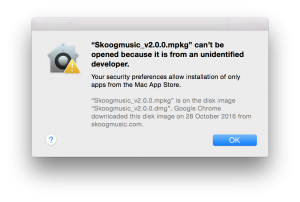
If you see a message like the one below when trying to install the Skoog software, it’s because the default application security preferences have been changed. Don’t worry, in just a few steps we’ll have you up and running!
1. Open the Terminal application – you can find it in the “Applications” folder.
2. Copy the following command and paste it into the Terminal window:sudo spctl –master-disable
3. Enter your user password to allow Terminal to carry out the changes to application installation permissions.
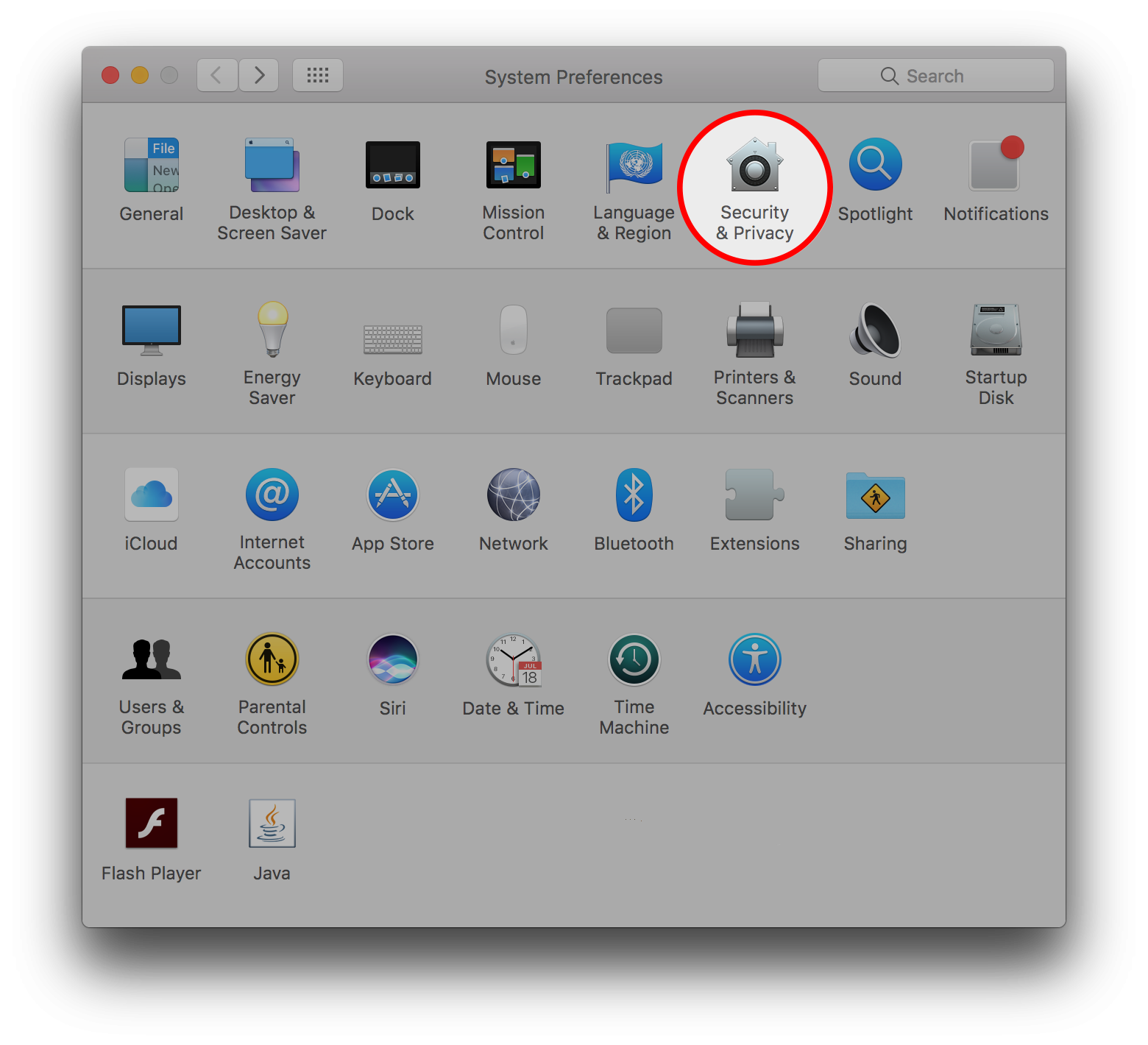
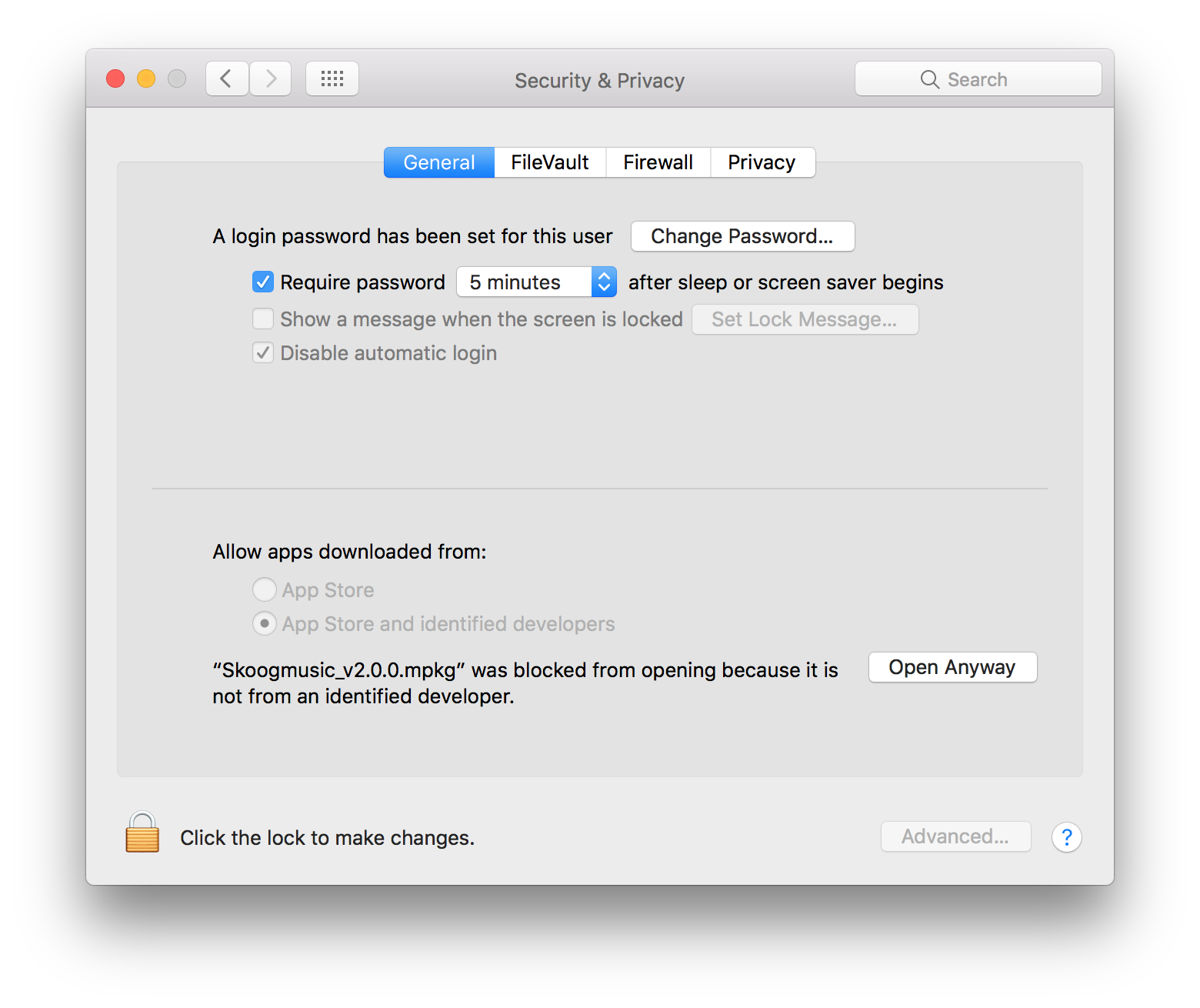
Still having problems? 10.12.1 may require a few additional actions to authorise the app.If after following the first three steps you still see the original security warning follow these steps:4. Go to System Preferences > Security & Privacy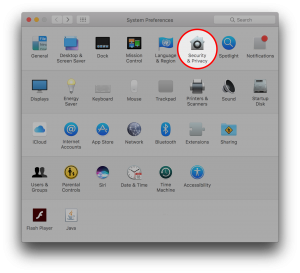
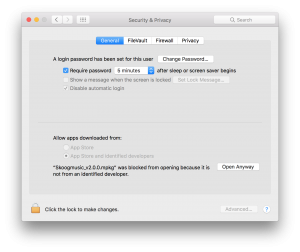 5. Click “Open Anyway” near the bottom of the window.The original warning will be shown on final time6. Click “Open”
That’s it, you will now be able to install the Skoog software.
- I can’t find my serial number. How do I register my Skoog?
You no longer need a serial number to download the Mac software or to access the education resources. To download the Mac software for both Skoog 1 and 2, you just need to head to the download page. To access all of the education resources and Skoog songbook, just head to our support section.
- I’ve tried connecting via the Bluetooth settings in iOS but it doesn’t seem to be working, what can I do?
Skoog needs to connect through the Skoog app directly. Please make sure you downlaod the app from the App Store and follow the instructions detailed in the app to connect your Skoog to your iOS device.
- Skoog for Education
- How can I access your educational resources?
To access our education resources and much more support, just head to our support section.
- About Skoog
- Is Skoog latex free?
The outside of Skoog 2.0 is made of polyurethane and contains no latex.
- How can I access your educational resources?
To access our education resources and much more support, just head to our support section.
- I can’t find my serial number. How do I register my Skoog?
You no longer need a serial number to download the Mac software or to access the education resources. To download the Mac software for both Skoog 1 and 2, you just need to head to the download page. To access all of the education resources and Skoog songbook, just head to our support section.
- Why is it a cube?
The design of Skoog has been developed over many years of research and participatory design work. The cube is a simple object that is easy to understand both visually and by touch, and it provides enough complexity to be creative whilst not excluding less able or younger users. And it looks pretty sweet too!
- What is Skoog made out of?
Skoog is made form polyurethane foam rubber with a polyurethane rubber skin, with a plastic base housing the electronic components.
- Can I use Skoog in a band or in an orchestra?
Yes, you can access a range of traditional orchestral sounds via an app like GarageBand, and you also have the option of augmenting traditional scores with colours or creating your own using coloured scores to help students play their parts. Check out our Skoog Songbook for coloured scores that we’ve already created for you.
- Does it light up?
Unfortunately not – but you do get colour feedback from the app!
- How do you clean it?
You can keep your Skoog clean with a wipe or a damp cloth. It is best to avoid alcohol based wipes as these may cause the rubber to degrade over time.
- How tough is it?
The Skoog’s sensors are buried deep in the polyurethane foam body which is protected by a polyurethane rubber skin making it a pretty tough cookie. If you have any concerns, contact a member of the team – info@skoogmusic.com
- Does the Skoogmusic app produce its own sounds?
Yes it does. The main ‘voice’ of the Skoog is generated by a synthesiser built into the app that offers a range of different synth sounds.
- Where does the sound output come from?
The sound from your Skoog will be routed through the audio output of your iPad/laptop/desktop computer. You can of course enhance the sound of your Skoog by connecting some high quality loudspeakers/headphones.
- Can you change the sounds on the Skoog?
You certainly can! Both the Skoogmusic iOS app and Skoogmusic OSX software boast a range of ultra expressive instrument sounds. With the MIDI functionality the choice of Skoog sounds is limitless!
- Where to Buy
- Where can I buy Skoog 2.0?
You can purchase Skoog 2.0, which includes the iOS App and Skoogmusic software for Mac, from Apple.com or from our Education Partners, as well as in selected Apple retail stores across Europe (PDF). Skoog 2.0 costs £179.95 / $199.95 (USD).
- How much is Skoog?
The Recommended Retail Price (RRP) of Skoog 2.0, which includes the iOS App and Skoogmusic software for Mac, is £179.95 / $199.95 USD.
- Can I still buy Skoog 1?
Yes you can, the wired Skoog 1 is still available to buy from a selection of our Education Partners. Get in touch with a member of our team to find your nearest Skoog 1 stockist.
- Using Skoog
- Is Skoog latex free?
The outside of Skoog 2.0 is made of polyurethane and contains no latex.
- I can’t find my serial number. How do I register my Skoog?
You no longer need a serial number to download the Mac software or to access the education resources. To download the Mac software for both Skoog 1 and 2, you just need to head to the download page. To access all of the education resources and Skoog songbook, just head to our support section.
- Is Skoog velocity sensitive?
Yes, Skoog also gives you plenty of squishy after touch.
- Is it just monophonic?
No – Skoog is polyphonic! You just need to go into your settings on the app and change from monophonic to polyphonic and that’s you ready to go.
- Can I use Skoog in a band or in an orchestra?
Yes, you can access a range of traditional orchestral sounds via an app like GarageBand, and you also have the option of augmenting traditional scores with colours or creating your own using coloured scores to help students play their parts. Check out our Skoog Songbook for coloured scores that we’ve already created for you.
- Do you need special music to work with?
No, the Skoog app integrates with your iTunes library or Spotify account so that you can play with any of the music you would normally listen to.
- What sort of music can you play with skoog?
You can play any music you want! With the iTunes and Spotify integration, the world really is your oyster – anything you want to listen to you can jam along with.
- Can you change the sounds on the Skoog?
You certainly can! Both the Skoogmusic iOS app and Skoogmusic OSX software boast a range of ultra expressive instrument sounds. With the MIDI functionality the choice of Skoog sounds is limitless!
- How sensitive is Skoog?
Skoog 2.0 needs just 500g of pressure to compress the foam enough to activate the sensor. The sensitivity is also adjustable, and by turning it up simply resting your hands on the Skoog should be enough to activate the sensors.
- How do I turn it on and off?
There is a small button on the base of your Skoog. Press once to turn your Skoog on. The battery indicator light will illuminate. Green means there is plenty of charge, red means it is low on power. Tap the button again to switch on Bluetooth and advertise.
It is important to turn Skoog off when not in use so as to conserve battery power. To turn Skoog off simply press and hold the button on the base for 5 seconds, at which point the battery indicator will flash twice and turn off. Your Skoog is now powered down.
- Can the Skoog connect by USB as well as Bluetooth?
It certainly can! Your wireless Skoog 2.0 can connect to the computer via USB, the same way you connect it to charge up its battery. You will need the Mac software to play the Skoog on this platform.
- How long is the battery life?
Skoog 2.0 can be used for up to 10 hours between charges.
- Technical Compatibilities
- Having trouble installing Skoog since updating to macOS Sierra?
If you see a message like the one below when trying to install the Skoog software, it’s because the default application security preferences have been changed. Don’t worry, in just a few steps we’ll have you up and running!
1. Open the Terminal application – you can find it in the “Applications” folder.
2. Copy the following command and paste it into the Terminal window:sudo spctl –master-disable
3. Enter your user password to allow Terminal to carry out the changes to application installation permissions.
Still having problems? 10.12.1 may require a few additional actions to authorise the app.If after following the first three steps you still see the original security warning follow these steps:4. Go to System Preferences > Security & Privacy5. Click “Open Anyway” near the bottom of the window.The original warning will be shown on final time6. Click “Open”That’s it, you will now be able to install the Skoog software.
- Can I use a Bluetooth speaker with Skoog?
A Bluetooth speaker can be used with iPad, iPhone and Mac. However, a typical Bluetooth speaker will add significant latency (audio delay) and this will make the Skoog very difficult to play “in time”. For this reason, we do not recommend connecting an external speaker via Bluetooth. A wired connection is always preferred and will give the lowest latency possible.
- Why can’t I connect to Mac OS X using Bluetooth?
We still need to build the drivers for this, but we are working on it! For more information, email a member of the team at support@localhost
- Which iPhone/iPod Touch/iPad models does Skoog support?
Skoog is compatible with iPad models that support Bluetooth Low Energy, including iPad 3rd Generation, iPad 4th Generation, iPad Air, iPad Air 2, iPad mini, iPad mini 2, iPad mini 3, iPad mini 4 and iPad Pro. It is compatible with Operating System 9. Our iOS apps are also compatible with iPhone and iPod models that support Bluetooth Low Energy. iPhone 4s, iPhone 5, iPhone 5c, iPhone 5s, iPhone SE, iPhone 6, iPhone 6 Plus, iPhone 6s, iPhone 6s Plus.
- Can I use Skoog with Ableton Live?
Of course! Skoog can connect to Ableton via MIDI using Skoogmusic iOS or OSX, but for extra features and customisation we are also developing an Ableton specific plugin, which will allow you to connect your Skoog to Ableton via Max for Live. Drop us an email for further details!
- Can I use Skoog with a Mac?
Absolutely! As well as being compatible with your iPad and iPhone, you can use your Skoog 2.0 with your Mac using our Skoogmusic software. You’ll need to download the software here then install it in order to run Skoogmusic on your Mac.
- Can the Skoog connect by USB as well as Bluetooth?
It certainly can! Your wireless Skoog 2.0 can connect to the computer via USB, the same way you connect it to charge up its battery. You will need the Mac software to play the Skoog on this platform.
- What is the wireless range of Skoog 2.0?
Skoog 2.0 connects wirelessly via Bluetooth, and has a range of approximately 10 meters.
- Can I connect two Skoogs to the same device?
Unfortunately, only one Skoog at a time can be connected to a device just now. However, we’re working on an update to allow you to connect up to two Skoogs at a time to the same device. Watch this space!
- Can I use my own sensor / controller with the app?
No. The Skoogmusic app and the Skoogmusic OSX/Windows software only work with the Skoog device.
- Does the Skoog work with a laptop / desktop computer?
Skoog 1.0 works with laptop / desktop computers, both Windows PCs and Apple Macs, via the Skoogmusic software platform.
At the moment Skoog 2.0 is compatible with Mac/iPhone/iPad only.
You can get information on downloading the Skoogmusic software here.
- Which iOS audio apps can the Skoog ‘play’?
Skoog can talk to any app that supports MIDI. Examples are GarageBand, Nanologue, Orphion and ThumbJam. It is also compatible with Network MIDI, which will allow you to connect your Skoog to apps on any compatible device via your WiFi network.
- Using the App for iPad & iPhone
- What if I don’t know what key a piece of music is in?
Don’t worry, the Skoog app has an Auto-Key detect function. As long as you are online it can look up the key of a song or piece of music and set it automatically on the Skoog so you can concentrate on rocking your socks off.
- Does the Skoog need to be tuned? Can it be tuned to acoustic instruments?
The Skoog app is tuned to concert pitch with A4=440Hz. The OSX software offers micro tuning functionality for more demanding performance requirements.
- Can I connect two Skoogs to the same device?
Unfortunately, only one Skoog at a time can be connected to a device just now. However, we’re working on an update to allow you to connect up to two Skoogs at a time to the same device. Watch this space!
- How do I get the Skoog app?
The Skoogmusic app is available via the iTunes App Store. The Skoogmusic software for Mac is available for download from our website.
- Using the Software for Mac
- Having trouble installing Skoog since updating to macOS Sierra?
If you see a message like the one below when trying to install the Skoog software, it’s because the default application security preferences have been changed. Don’t worry, in just a few steps we’ll have you up and running!
1. Open the Terminal application – you can find it in the “Applications” folder.
2. Copy the following command and paste it into the Terminal window:sudo spctl –master-disable
3. Enter your user password to allow Terminal to carry out the changes to application installation permissions.
Still having problems? 10.12.1 may require a few additional actions to authorise the app.If after following the first three steps you still see the original security warning follow these steps:4. Go to System Preferences > Security & Privacy5. Click “Open Anyway” near the bottom of the window.The original warning will be shown on final time6. Click “Open”That’s it, you will now be able to install the Skoog software.
- Can the Skoog be used to record and sample audio through a microphone?
The Skoogmusic OSX offers extensive sampling and audio recording functionality for the Skoog 2.0. We are working towards providing the same functionality for the Skoogmusic iOS app, although you can also utilise other readily available sampling apps and connect your Skoog to it via MIDI.
- Does the Skoog need to be tuned? Can it be tuned to acoustic instruments?
The Skoog app is tuned to concert pitch with A4=440Hz. The OSX software offers micro tuning functionality for more demanding performance requirements.
- Can I connect two Skoogs to the same device?
Unfortunately, only one Skoog at a time can be connected to a device just now. However, we’re working on an update to allow you to connect up to two Skoogs at a time to the same device. Watch this space!
- How do I get the Skoog app?
The Skoogmusic app is available via the iTunes App Store. The Skoogmusic software for Mac is available for download from our website.
- What is the hardware specification for Skoog 2.0?
Connectivity: Bluetooth 4.0
Range: 10m
Latency: Conforms with Apple’s BLE MIDI Specification
Data resolution: 10 Bit
Power source: Battery
Battery type: Lithium Ion
Battery life; 10 Hours playing time
Sensitivity: Adjustable from 500g+- Accessibility
- Is Skoog suitable for amputees?
Skoog can be played using just one hand, making it perfect for amputees. Certain users they may find using a mount will make Skoog more accesible for them. For more information about mounting solutions for Skoog, simply contact a member of the team at info@skoogmusic.com.
- Do you have to use your hands?
No, the tactile squeezy interface can be played using any part of the body, hands, feet, chin, or even elbow!
- Can Skoog be used for Music Therapy?
Skoog is perfect for clinical music therapy and with practice it can be quickly tailored to suit the immediate physical and emotional needs of the client. Highly portable, it allows you to bypass the playing constraints of conventional musical instruments and elicit a musical response with even the slightest touch on any part of the Skoog, using any part of the body.
- Is it suitable for someone with a physical disability?
Yes, the universal design of Skoog in combination with its adaptable software platform make it perfect for those who face challenges learning more traditional instruments.
- Is it suitable for someone with a learning difficulties?
Yes, the universal design of Skoog in combination with its adaptable software platform make it perfect for those who face challenges learning more traditional instruments.
- Is it suitable for someone with autism?
Yes, Skoog can be used by everyone, young and old. The tactile nature of the Skoog interface is can be especially engaging for users with Autism, and the tuning presets make it easy for Skoog players to join in with group music making activities.